Shopping Cart
Cart Page FAQs
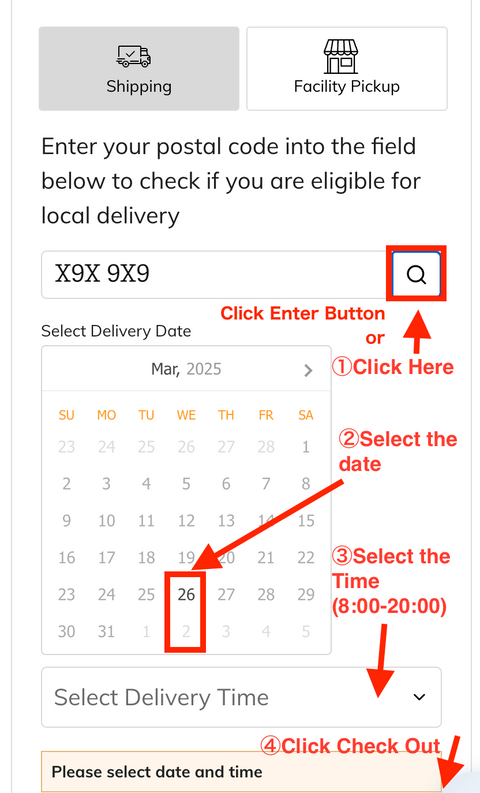
How to work the delivery calendar?
–Step-by-Step Guide here
Step 1: Enter Your Postal Code
Type your postal code into the designated field.
Click the enter button or search icon (magnifying glass) next to the postal code field to check if delivery is available.
Step 2: Select Your Delivery Date
Choose a date from the calendar that works for you.
Step 3: Click Your Delivery Time
Click a time 8:00 AM and 8:00 PM.
Step 4: Click "Check Out"
Once the date and time are selected, proceed to checkout to complete your order.
💡 Tip: If you are selecting "Facility Pickup" instead of shipping, ensure you have chosen the correct option at the top of the page.
We appreciate your feedback and are always here to help! If you have any further issues, feel free to contact our support team.